
From a weapon comparison to a saved gear plan
Use a level-30 Arms Warrior to learn the workflow: Corpsemaker is the illustrative current weapon, Whirlwind Axe is the goal, and Off Hand stays empty. You will inspect the differences, save the plan under a name, export a backup and open a shared copy.
Walkthrough checked in a local browser build. Screenshots show the actual WOWBIS interface with an isolated example plan. This verifies the website workflow; it is not a game-client test or proof of acquisition. The Whirlwind comparison retains its own dated item and quest evidence.
1. Open the example as a draft
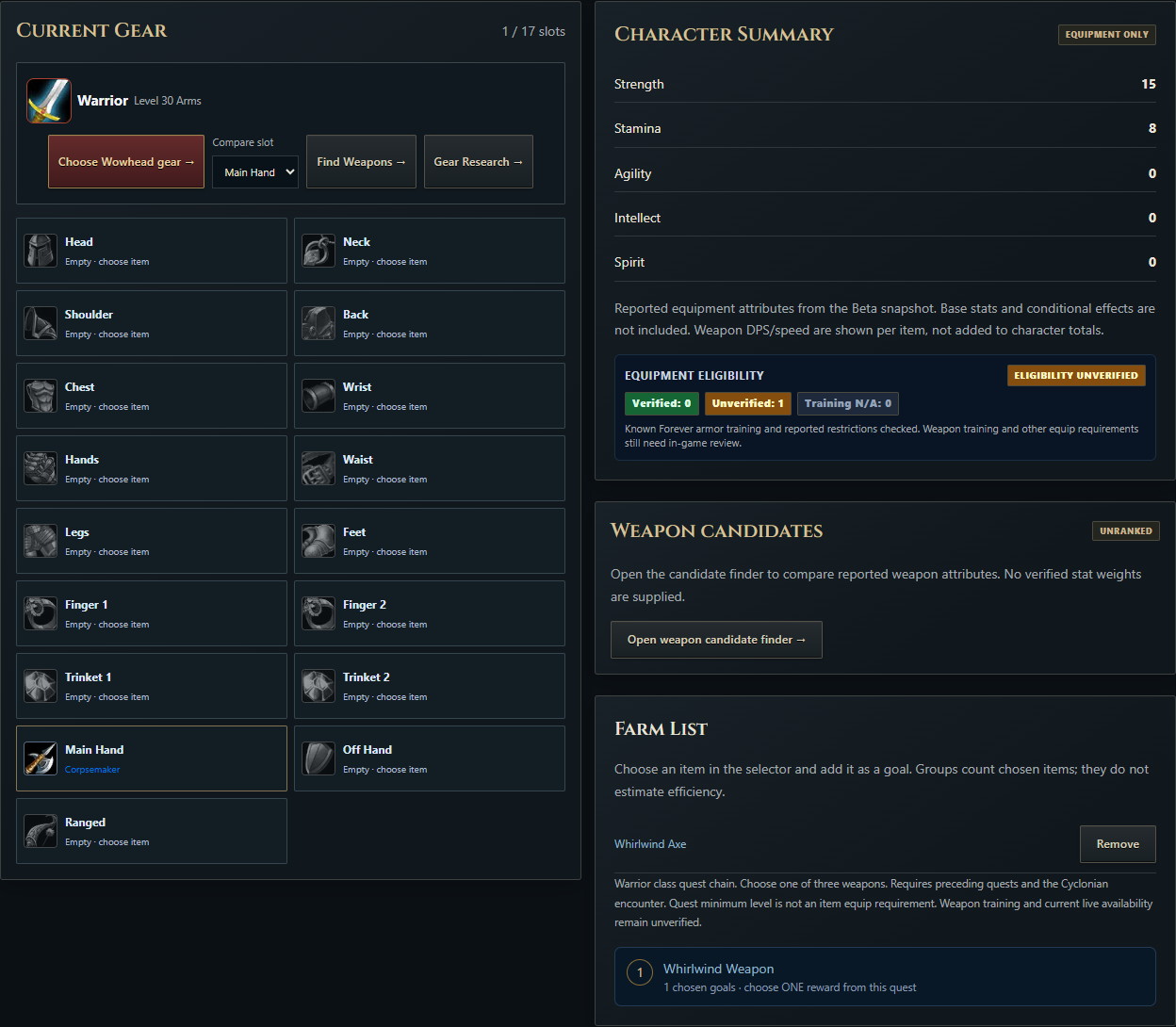
Open the link below. Check that the character header says Warrior, Arms and Level 30. In Current Gear, Main Hand should be Corpsemaker. Whirlwind Axe should appear in your goals, shown under Farm List. Other equipment slots are intentionally empty: the example makes one weapon decision and does not invent a complete set.
Opening a draft does not save it to your browser library. If you already have a local plan, the example is a separate draft; review its name and equipment before pressing Save.
2. Compare the item fields before changing equipment
Open Corpsemaker versus Whirlwind Axe. The current records show 28.95 versus 35.56 weapon DPS, 15 versus 16 Strength and 8 versus 15 Stamina. These are recorded item differences. They do not predict a character-DPS percentage, ability damage or Rage generation.
Corpsemaker's speed is absent from the imported record. Keep that difference unknown. Both weapons are two-handed, so the planned replacement keeps Off Hand empty. Read the Whirlwind quest's choose-one restriction before treating all three rewards as goals from one completion.
For your own character, replace the illustrative baseline with the weapon you actually own and set your real level and specialization. If a change prompts you to review equipment removals, inspect the affected slots before confirming.
3. Name and save the local plan
- Find the plan-name field in the planner's saved-plan controls. Enter Level 30 axe goal.
- Press Save. If a review dialog appears, inspect the listed uncertainties and changes before accepting.
- Check the status message and the saved-plan selector. Your name should be present.
- Reload the planner and verify that Current Gear and Gear Goals still match the example.
To keep a second alternative, use Save as new with a distinct name instead of overwriting the first plan. The browser stores these named plans locally. A save in one browser does not automatically appear on your phone or another browser.

4. Share an editable copy
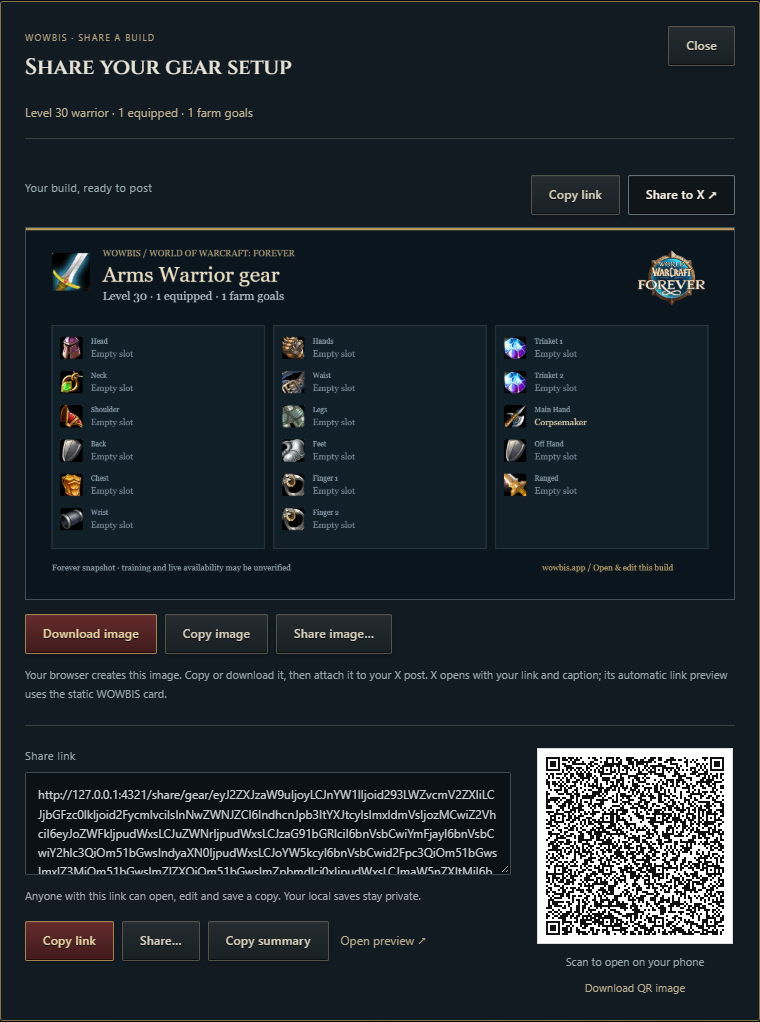
Press Share and use the share link or QR code. Open the link in another browser or device to inspect the same equipment and goal. The recipient opens a draft and saves a separate local copy if they want to retain it; later changes to your local plan do not update that copy.
The shared example should still show Corpsemaker equipped and Whirlwind Axe as a goal. Share the guide's item and quest evidence alongside the plan when explaining the choice. A shared plan is an equipment arrangement, not an endorsement that every item is obtainable.
5. Export a portable backup
Use Export JSON and download the plan file. Keep the file somewhere you can find it. On another browser, use the planner's JSON import, inspect the resulting draft and save deliberately. The Backups page also provides the site's backup workflow.
When the result looks different
- The target is not in Current Gear
- That is expected: a goal records intent. It does not equip the weapon or mark it obtained.
- The example has only one equipped item
- The remaining slots are intentionally blank. Add your owned equipment manually instead of treating the example as a recommended full set.
- A saved plan is missing on another device
- Named saves belong to the browser that created them. Transfer the share link or JSON file, review the draft, then save on that device.
- Automatic verified fill is unavailable
- This does not prevent comparing or manually planning equipment. Read the item's remaining requirements and avoid treating a guide candidate as fully verified training.
Turn one comparison into a repeatable routine
The example in this walkthrough follows one Warrior and one weapon, but the same routine works for any class and any slot. Start by opening Weapon Finder with your real class, level and slot, and select the item you actually own as the baseline. Then open Item Compare for the current item and one candidate only, and read the recorded fields side by side before changing anything in a plan. The worked example compares Corpsemaker at 28.95 weapon DPS, 15 Strength and 8 Stamina with Whirlwind Axe at 35.56 weapon DPS, 16 Strength and 15 Stamina. Those are recorded item differences, not a character-DPS forecast.
Once the comparison is clear, carry it into Gear Planner as a named plan instead of keeping it in your head. Record the item you own in Current Gear, add the candidate to Gear Goals, and save the plan under a name that states the decision, such as the level-30 axe goal used in the example. If you are weighing two candidates, save each as a separate named plan. Before the December 9 opening, compare the saved goal with the ranked list on the Arms Warrior BiS page. Reopen the saved plan after a reload and confirm that Current Gear and Gear Goals still match what you entered.
Check a plan before the December 9 opening
The raids open on December 9, with Barrow Deeps, Hyjal Summit and Onyxia on the schedule, so a plan saved weeks earlier deserves a short review before that date. Work through the checklist below for each plan you intend to use, and fix what fails the check instead of assuming the saved draft is still current.
- Level and specialization still match your character. A plan saved at level 30 for Arms does not describe a level-60 Protection character, so update the header before trusting the slots.
- Current Gear still lists what you own. Move anything you have replaced or lost out of Current Gear, and keep unobtained items in Gear Goals until you can equip them.
- Each goal has its requirement checked. An imported equip level of 0 does not establish that a quest is available or that training is complete, so confirm access in game before treating a goal as a farm target.
- A portable backup exists. Export the plan as JSON and keep the file where you can find it, and use the Backups page for the site backup workflow before clearing browser data.
- The share link still opens the intended draft. Open it in another browser and confirm the same equipment and goal appear, because a recipient sees a draft copy, not your live library.
Common mistakes when reading a plan
Four mistakes recur when readers return to a saved plan, and each one is easy to avoid once it is named. First, a goal in Gear Goals is not equipped gear. The example keeps Whirlwind Axe as a goal while Corpsemaker stays in Current Gear, and that separation is deliberate: a goal records intent, not possession. Second, a saved plan lives in the browser that created it. It will not appear on another device unless you transfer the share link or exported JSON file, review the draft, and save it there. Third, a missing field is unknown, not zero. Corpsemaker has no recorded swing speed in the imported record, so the example does not calculate a timing advantage from it, and no other field can fill that gap. Fourth, a weapon-DPS difference is not a character-DPS forecast. The recorded gap between 28.95 and 35.56 weapon DPS describes two items; it does not establish how much harder your character hits, how much Rage you gain, or how a rotation performs. For the weapon decision behind the example, see the level-30 Warrior weapon guide.
Frequently asked questions
What does the walkthrough use as an example?
A level-30 Arms Warrior: Corpsemaker is the illustrative current weapon, Whirlwind Axe is the goal, and Off Hand stays empty.
Does opening the example draft save it to my library?
No. Opening a draft does not save it to your browser library. Review its name and equipment before pressing Save.
What is the recorded difference between Corpsemaker and Whirlwind Axe?
28.95 versus 35.56 weapon DPS, 15 versus 16 Strength and 8 versus 15 Stamina. These are recorded item differences; they do not predict a character-DPS percentage.
Why is Corpsemaker’s speed missing?
Its speed is absent from the imported record. Keep that difference unknown.
Is this a game-client test?
No. Screenshots show the actual WOWBIS interface with an isolated example plan. This verifies the website workflow; it is not a game-client test or proof of acquisition.
Can I reuse this walkthrough for a different class?
Yes, with your own baseline. Open Gear Planner, set your class, specialization and actual level, record the item you own in Current Gear, and add one candidate to Gear Goals. The Warrior example only illustrates the steps; it does not supply another class with a recommended weapon.
Does the planner check whether I can equip an item?
No. The planner records the equipment arrangement you enter and shows the recorded item fields; it does not verify your level, training, quest access or faction requirements. Confirm those conditions in game before treating a saved goal as obtainable, and keep uncertain items as research goals.
What should I check in a plan someone shared with me?
Open the link in your own browser and read the character header, Current Gear and Gear Goals before saving anything. Confirm the class, specialization and level match the character you intend it for, inspect each recorded field, and save it as a separate local copy only if the arrangement fits your character.